5 Signs Your Clinic’s Google Ads Budget Is Being Wasted

Quick Summary
- The most common signs your Google Ads budget is being wasted are invisible inside the Campaigns tab and only show up in the Search Terms report.
- Clinic Google Ads mistakes like running broad matches without a proper negative keyword list silently drain the budget on patients who will never book.
- Without conversion tracking for phone calls, Google’s algorithm optimizes for clicks instead of actual patient appointments.
- Medical practice PPC wasted spend compounds when agencies set campaigns once and leave them running without weekly review.
- The fix for Google Ads for clinics not working starts with auditing match types, tracking setup, and landing page performance together, not in isolation.
- Clinic owners who reduce Google Ads spend in healthcare successfully do it by cutting irrelevant traffic first, not by reducing budget across the board.
Over 60% of clinic owners running Google Ads have no idea how much of their budget is spent on people who will never become patients. The signs your Google Ads budget is being wasted are rarely obvious on the surface. Your dashboard shows clicks, your ad shows impressions, and your agency sends a report with green numbers. Yet the appointment book stays half empty.
If you run a dental, skin, hair, or wellness clinic and your Google Ads are not generating consistent patient inquiries, the problem is almost never the platform. It is how the campaigns are set up and managed. This guide highlights the five most common waste signals in clinic ad accounts. It shows you what to check in your own dashboard today.
What Causes Google Ads Budget to Be Wasted for Clinics
Most clinic owners assume Google Ads budget waste because of high competition or expensive keywords. The real cause is almost always structural. Campaigns using broad match instead of exact match often go unchecked. When conversion goals focus on page visits rather than actual bookings, they waste money. Also, ad groups that target the wrong intent quietly drain budgets without clear warnings.
Google can spend your full ad budget even when clicks don’t convert. Without proper targeting and tracking, a clinic spending ₹50,000 monthly could waste thousands. These five signs can help identify where your healthcare ads are losing money.
2026 Benchmark: Google Ads accounts in healthcare and medical services that lack a negative keyword list send about 30 to 50% of total spending to non-patient queries. This includes job searches, requests for free treatments, and competitor brand names. This is confirmed across multiple PPC audit studies published in 2025 and 2026.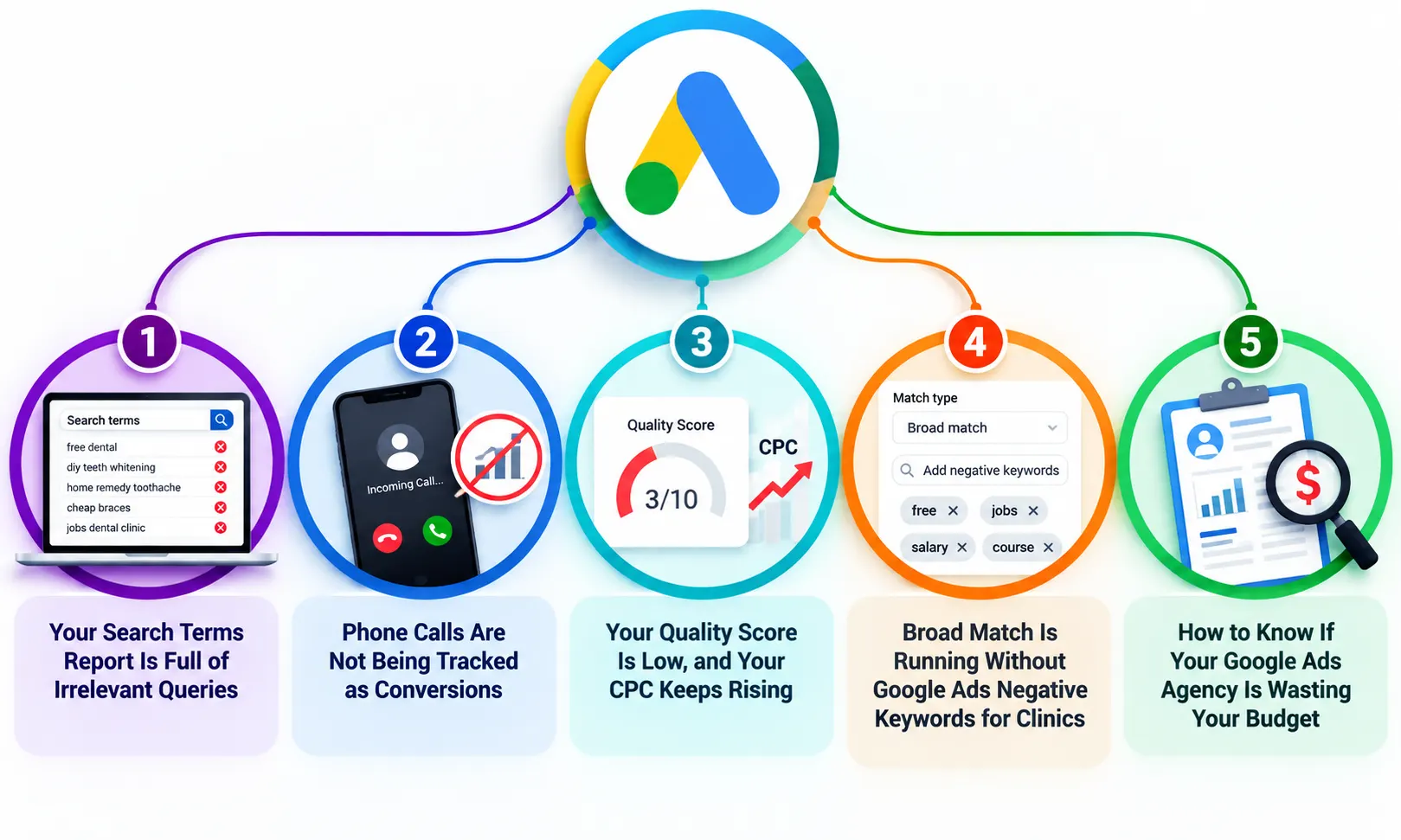
Sign 1: Your Search Terms Report Is Full of Irrelevant Queries
What to Check
Open your Google Ads account and go to Keywords, then Search Terms. Sort by cost, highest first. Read through the top 50 terms your ads actually showed up for. This is one of the clearest signs your medical practice PPC campaign is failing. If you see queries like “free dental treatment,” “how to do teeth whitening at home,” “dentist salary,” or competitor clinic names you never intended to target, your budget is being consumed by people who are not patients.
This happens because Google’s default settings, like broad match, let your ads show up for any query that Google thinks is related to your keywords. For a clinic targeting “dental implants,” broad matches can trigger ads for “dental implant cost DIY” or “dental implant jobs in Mumbai.” Both clicks cost real money, and neither will ever book an appointment. Left unchecked, this steadily drains your Google Ads budget week after week.
How to Fix It
- Add a negative keyword list immediately. Start with words like “free,” “cheap,” “jobs,” “salary,” “home remedy,” “DIY,” “course,” and “review.”
- Switch high-volume keywords from broad match to phrase match or exact match to tighten control over which searches trigger your ads.
- Review the Search Terms report every week for the first 60 days of any new campaign. Add new negatives each time.
- This is one of the most common clinic Google Ads mistakes and the fastest to fix once identified.
Sign 2: Phone Calls Are Not Being Tracked as Conversions
Calls Drive Bookings
For clinics, the phone call is the most valuable conversion action. A patient who calls your clinic is far more likely to book than one who fills out a contact form. Yet most clinic ad accounts track only form submissions or website page views as conversions. This means Google’s algorithm is optimizing to get more people to visit your website, not to get more people to call and book appointments.
Without proper conversion tracking for phone calls, you are flying blind. Your account might show 80 conversions in a month while your front desk team took only 12 patient calls from ads. The discrepancy comes from 68 conversions. These were people who clicked your home page but didn’t take any meaningful action. Google counted them as converted because the tracking was set up incorrectly. Fixing this single issue often protects a significant share of your Google Ads budget.
What Good Tracking Looks Like
- Set up call tracking using Google Ads call extensions with call conversion actions tied to calls over 60 seconds in length.
- Use Google’s forwarding number feature so every call from an ad click is counted as a conversion separately from organic calls.
- Remove page visit-based conversions from your primary conversion actions and keep only real patient intent signals like calls and appointment form completions.
- Once tracking is clean, your cost per acquisition in healthcare reporting will reflect actual patient acquisition cost, not vanity metrics.
“If your Google Ads account is tracking website sessions as conversions, your campaign is optimizing to send more visitors to your homepage. That is not a patient acquisition strategy. That is a traffic strategy dressed up as one.”
Sign 3: Your Quality Score Is Low, and Your CPC Keeps Rising
Quality Score Explained
Quality Score in Google Ads is Google’s rating of how relevant your ad, keyword, and landing page are to the person searching. It is scored from 1 to 10. A high Quality Score shows that Google sees your ad as a strong match for the search query. This can lead to lower costs per click and better ad positions. A low Quality Score means you pay more per click than competitors. This happens even if your bids are the same, but their accounts are better structured.
For clinics, low Quality Scores almost always come from one of three places. The ad copy does not match what the patient searched for. The landing page the patient lands on is a generic homepage with no specific connection to their search. Or the keyword targeting is too broad, pulling in irrelevant traffic that bounces immediately, signaling poor relevance to Google. All three push costs up and patient bookings down simultaneously.
Quick Fixes That Work
- Create separate ad groups for each treatment. A patient searching for “teeth whitening in forest hills” should see an ad specifically about teeth whitening, not a generic “Best Dental Clinic” ad.
- Send each ad group to a dedicated landing page for that treatment, not your homepage.
- Include the search keyword naturally in your ad headline, description, and landing page H1.
- This alignment between keyword, ad, and landing page is the foundation of fixing why your clinic is not getting patients from Google Ads.
| Waste Signal | Where to Check It in Google Ads |
| Irrelevant search terms consuming budget | Keywords and search terms, sorted by cost descending |
| Phone calls not tracked as conversions | Goals then Conversions, check conversion action types |
| Low Quality Score on keywords | Keywords tab, add Quality Score column |
| Broad match running without negatives | Keywords tab, check match type column |
| Agency not touching the account | Change History under Tools, check last edit date |
Sign 4: Broad Match Is Running Without Google Ads Negative Keywords for Clinics
The Match Type Problem
Understanding broad match vs exact match helps clinics avoid wasted ad spend. Broad match can show ads for loosely related searches, while exact match gives tighter control by targeting searches closely related to your chosen keywords.
This is one of the most common Google Ads mistakes healthcare clinics make. A clinic that uses a broad match for “hair transplant clinic” might pay for clicks from searches like “hair regrowth home tips,” “hair transplant documentary,” or “hair transplant before and after photos.” None of those people are booking patients. All of those clicks drain your daily budget before the right patients even have a chance to see your ad.
The Negative Keyword Fix
Google Ads negative keywords for clinics help prevent ads from appearing for irrelevant searches. Adding terms related to jobs, free treatments, DIY solutions, and unwanted competitors can reduce wasted clicks while keeping your ads visible to potential patients. This single fix can reclaim a meaningful share of your Google Ads budget within days.
Action Step: Go to your Google Ads account now. Under Tools, open Shared Library, then Negative Keyword Lists. If this section is empty or has fewer than 30 terms, your campaign is running with the door open. Add negatives before your next billing cycle starts.
Sign 5: How to Know If Your Google Ads Agency Is Wasting Your Budget
Check Change History
This is the sign clinic owners find most uncomfortable but most important. If you want to know how to know if your Google Ads agency is wasting your budget, the answer is inside your own account. Go to Tools, then Change History.
This log shows every single action taken inside your account with a timestamp. If the last entry is from three weeks ago, your agency has not touched your campaign in three weeks. Your budget has been on autopilot. It’s spending daily without optimization. No new negatives have been added, and no adjustments have been made based on what works.
Red Flags to Watch
- No changes made in the past 30 days on an active campaign spending a meaningful budget.
- Monthly reports showing impressions and clicks but no data on actual patient calls or appointment bookings.
- The landing page is your clinic homepage, not a treatment-specific page built for conversions.
- Campaign has been running for six months with the same ad copy and no A/B test ever attempted.
- The agency cannot explain what your current cost per acquisition in healthcare is or how it has trended month over month.
Understanding how to stop wasting money on Google Ads budget for your clinic starts with clear reporting. Track patient calls, cost per call, and keywords generating enquiries. Your agency should clearly show how your ad budget drives patient growth.
How to Stop Wasting Your Clinic’s Google Ads Budget Starting This Week
Every clinic running Google Ads is losing some budget to waste. The question is how much and whether it is being caught before it compounds. The signs your Google Ads budget is being wasted are all visible inside your own account if you know where to look. The Search Terms report, Change History, conversion action definitions, Quality Score column, and your match type settings together tell the complete story of where your money is going and whether it is generating patients.
The fix is never to simply increase the budget. More budget flowing into a broken account creates more waste faster. The fix is to clean the account structure first, track phone calls correctly, add negative keywords, align ads to dedicated landing pages, and then scale what is working. Google Ads for clinics works exceptionally well when set up with patient acquisition as the only goal. It fails silently when set up as a generic traffic campaign with no clear conversion definition.
How Marketing A Clinic Stops the Budget Bleed for Your Practice
Marketing A Clinic is a digital marketing agency headquartered in Baltic, Connecticut, specializing in Google Ads management for dental and beauty clinics. We audit each account for the five waste signals in this guide. Then, we fix the structure, set up call tracking, and build a negative keyword framework. We do all this before spending any money on new traffic.
If your clinic is spending on Google Ads but not seeing consistent patient bookings, a structural problem is almost always the cause. We identify it in a free account audit and show you exactly where your budget is going and what a corrected campaign looks like. Book Your Free Strategy Session today and get a clear picture of where your money is actually going.
Frequently Asked Questions
Q1. What causes Google Ads budgets to be wasted for clinics?
Broad match keywords, missing negative keyword lists, and wrong conversion tracking are the top three reasons clinics waste their ad budgets.
Q2. How do I know if my clinic’s ad spend is being wasted?
Check your Search Terms report for any irrelevant queries. Also, review your Change History to confirm if your agency is managing the account weekly.
Q3. What are common reasons Google Ads campaigns fail for medical practices?
Poor quality score in Google Ads, no call tracking, broad match without negatives, and landing pages that send patients to a generic homepage.
Q4. How can clinics reduce wasted Google Ads spend?
Build strong Google Ads budget with negative keywords for the clinic list, switch to phrase or exact match, and track only real patient actions as conversions.
Q5. What is a broad match and why does it waste ad budget?
Broad match vs exact match determines which searches trigger your ad. Broad match allows irrelevant searches, which wastes budget on non-patient clicks.
Q6. Why is my clinic’s Google Ads not generating leads?
Most clinics with this problem have medical practice PPC wasted from incorrect match types, no call tracking, or landing pages with low conversion rates.
Q7. How do I know if my Google Ads agency is wasting my budget?
Check Change History in your account. If your agency has not made updates in 30 days on an active campaign, your budget is running unmanaged on autopilot.
Q8. How long does it take to fix wasted Google Ads budget for a clinic?
Most clinic Google Ads mistakes show measurable improvement within 30 to 45 days of fixing negative keywords, tracking, and landing page alignment together.